
Paramètres de Vol des Drones
1. Description
Découvrez les directives et les réglages essentiels pour maximiser les performances et ajuster les paramètres de vol afin d'obtenir des résultats optimaux.
2. Paramètres de vol pour l'exploitation minière et les agrégats
2.1 Paramètres
| Produits | ||
| VOILURE FIXE | RVB |
|
| Multispectral | ||
| LiDAR mVux | ||
| MULTI-ROTORS | RVB |
|
| Multispectral |
2.2 Recommandations
- Pour les projets avec plusieurs vols, il doit y avoir un chevauchement entre les différents vols et les conditions (direction du soleil, météo, etc.)
- Paramètres de caméra recommandés : Temps d'exposition : moins de 1/1000 s ; Sensibilité ISO : moins de 400 ; Distance focale fixe ; Mise au point infinie.
3. Paramètres de vol pour les champs d'essai et les champs de production
3.1 Paramètres
| Produit | Cartes de reconnaissance | Estimation DTM / Hauteur de la plante | Fcover / Floraison / Staygreen | Comptage / Levée | Détection de mauvaises herbes |
| MULTI-ROTORS ET VOILURE FIXE | RVB |
GSD : 1 à 10cm Chevauchement avant : 80% Chevauchement latéral : 80 % Vitesse de vol multi-rotor : max 8m/s |
GSD : 1 à 5 cm Chevauchement avant : 80% Chevauchement latéral : 80% Vitesse de vol multi-rotor : max 8m/s |
GSD : 1 à 5cm (1) Chevauchement vers l'avant : 80 % Chevauchement latéral : 80 % Vitesse de vol multi-rotor : max 8m/s |
|
|
Multispectral Hyper-spectral Thermique | |||||
| LiDAR | N/A |
Multi-écho LiDAR : 50 points/m² Nombre d'échos : 3 échos minimum |
N/A | N/A | |
3.2 Recommandations
-
S'il y a plusieurs vols dans la même zone d'Intérêt (pour une campagne), ils doivent être co-enregistrés :
- Définir des points de contrôle au sol (GCP) mesurés : au moins un à chaque coin du champ + un au milieu du champ
- Ou le drone doit être équipé de fonctions PPK ou RTK : nous vous recommandons d'utiliser une station GNSS mobile. Si vous utilisez une station GNSS fixe connue, la distance maximale jusqu'à la zone d'intérêt est de 15 km.
- Évitez de voler pendant la période du soleil en azimut ou lorsque le soleil est bas (ombres)
- Évitez de voler lorsque le temps alterne entre ensoleillé et nuageux
- Pas d'eau ou de neige sur la canopée
- Prenez des photos du panneau d'étalonnage AVANT et APRÈS le vol (multi-spectral). Suivez les directives du fabricant du capteur + Voir Paragraphe 8.
- Ajoutez des trajectoires d'UAV supplémentaires en dehors de la zone d'intérêt pour vous assurer de collecter suffisamment de pixels de bonne qualité dans les limites du champ
- Évitez de survoler des éléments perturbateurs qui pourraient affecter la réflectance tels que des bâtiments ou des voitures.
-
Recommandations spécifiques pour les capteurs de volet roulant :
-
Arrêtez le drone lors de la prise de vue si les capacités du drone le permettent ou :
- assurez-vous que la vitesse de vol est de 5 m/s maximum et que la vitesse est stable pendant tout le vol
- Réglez le temps d'obturation sur max 1/600 et stable pendant tout le vol
- Chevauchement : 85 %
-
Arrêtez le drone lors de la prise de vue si les capacités du drone le permettent ou :
(1) La taille du couvert végétal doit être égale à deux fois le GSD . Ex : la taille de l'auvent est de 8 cm, le GSD doit être de 4 cm
4. Paramètres de vol pour la plantation et la foresterie
4.1 Paramètres
| Produit: | Cartes de reconnaissance | Couverture |
Estimation DTM Hauteur de la plante Nombre d'arbres |
|
| MULTI-ROTORS ET VOILURE FIXE |
Multispectral Hyper-spectral Thermique |
GSD : 5 à 15cm (1) Chevauchement avant : 80% Chevauchement latéral : 80% Vitesse de vol multi-rotor : max 8m/s |
||
| LiDAR | N/A | N/A |
Multi-écho LiDAR : 50 points/m² Nombre d'échos : 3 échos minimum |
|
4.2 Recommandations
-
S'il y a plusieurs vols dans la même zone d'Intérêt (pour une campagne), ils doivent être co-enregistrés :
- Définir des points de contrôle au sol (GCP) mesurés : au moins un à chaque coin du champ + un au milieu du champ
- Ou le drone doit être équipé de fonctions PPK ou RTK : nous vous recommandons d'utiliser une station GNSS mobile. Si vous utilisez une station GNSS fixe connue, la distance maximale jusqu'à la zone d'intérêt est de 15 km.
- Évitez de voler pendant la période du soleil en azimut ou lorsque le soleil est bas (ombres)
- Évitez de voler lorsque le temps alterne entre ensoleillé et nuageux
- Pas d'eau ou de neige sur la canopée
- Prenez des photos du panneau d'étalonnage AVANT et APRÈS le vol (multi-spectral). Suivez les directives du fabricant du capteur + Voir Paragraphe 8.
- Ajoutez des trajectoires d'UAV supplémentaires en dehors de la zone d'intérêt pour vous assurer de collecter suffisamment de pixels de bonne qualité dans les limites du champ
- Évitez de survoler des éléments perturbateurs qui pourraient affecter la réflectance tels que des bâtiments ou des voitures.
-
Recommandations spécifiques pour les capteurs de volet roulant :
-
Arrêtez le drone lors de la prise de vue si les capacités du drone le permettent ou :
- assurez-vous que la vitesse de vol est de 5 m/s maximum et que la vitesse est stable pendant tout le vol
- Réglez le temps d'obturation sur max 1/600 et stable pendant tout le vol
- Chevauchement : 85 %
-
Arrêtez le drone lors de la prise de vue si les capacités du drone le permettent ou :
(1) La taille du couvert végétal doit être égale à deux fois le GSD . Ex : la taille de l'auvent est de 8 cm, le GSD doit être de 4 cm
5. Paramètres de vol pour les corridors
5.1 Paramètres
| Produit | ||
| VOILURE FIXE | RVB |
|
| Multispectral | ||
| LiDAR mVux |
|
|
| MULTI-ROTORS | RVB |
|
| Multispectral |
5.2 Recommandations
(2) En fonction à la fois de la largeur du corridor de végétation et de l'exigence de densité de nuages de points prévue. Par exemple : le chevauchement latéral des lignes de transmission est de 30 m
- Pour les projets avec plusieurs vols, il devrait y avoir un chevauchement entre les différents vols.
6. Paramètres de vol pour l'inspection des lignes électriques
6.1 Paramètres
| DES PRODUITS | ||
| VOILURE FIXE | RVB | |
| Multispectral | ||
| LiDAR mVux | ||
| MULTI-ROTORS | RVB |
Distance de vol (entre capteur et cible) : Entre 15m (~ GSD =3.5cm) et 80 m (~GSD=5.5cm) (3) Chevauchement vers l'avant : aucun Chevauchement latéral : aucun |
| radiométrique IR |
6.2 Recommandations
(3) Particulièrement vrai pour les capteurs IR afin de ne pas perdre en efficacité lors de l'inspection IR
- Drone suggéré : série DJI Matrice 200
- Capteur suggéré : Zenmuse XT2
7. Paramètres de vol pour l'inspection des panneaux solaires
7.1 Paramètres
| Des produits | ||
| VOILURE FIXE | RVB | |
| Multispectral | ||
| LiDAR mVux | ||
| MULTI-ROTORS | LiDAR mVux |
|
| Multispectral |
7.2 Recommandations
- Un chevauchement minimum de 80% est requis
- La caméra IR doit être radiométrique avec une résolution minimale de 640 x 480
- Le format recommandé est JPEG radiométrique
- Drone suggéré : série DJI Matrice 200
- Capteur suggéré : Zenmuse XT2
8. Cas des cibles d'étalonnage
Suivre les recommandations du fabricant du capteur.
Recommandations complémentaires Alteia :
-
Prenez des photos de la cible d'étalonnage AVANT et APRÈS le vol
- Les cibles d'étalonnage doivent être placées au sol
- Les photos doivent être prises par l'opérateur avec le drone utilisé
- Prendre des photos aussi près que possible de la cible d'étalonnage afin de minimiser la réflexion des objets situés à l'extérieur de la cible d'étalonnage

-
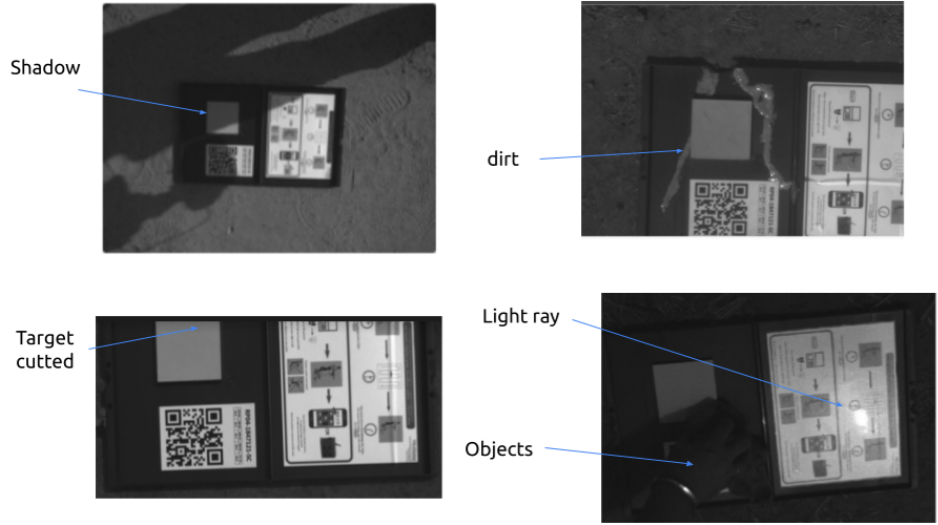
Évitez les éléments perturbateurs sur l'ensemble de l'image(y compris à l'intérieur et à l'extérieur de la cible d'étalonnage) : ombres, rayons lumineux, objets réfléchissants...
- Si possible, ajoutez une « bâche » noire/matte derrière la cible d'étalonnage pour éviter les objets gênants sur l'ensemble de l'image. Le type de matériau doit être choisi avec soin pour éviter les rayons lumineux. Ceci est particulièrement recommandé lorsqu'un capteur d'irradiation est monté sur le drone.
-
Seule une série d'images (y compris une image par bande spectrale) doit être sélectionnéeet téléchargée dans Aether.
- Pour sélectionner le bon jeu d'images :
- 1) Ouvrez le dossier post-flight processed et localisez le dossier d'images « Calibration ». Dans le dossier Calibration, vous devez commencer par la bande bleue (blue).
- 2) Trouvez l'image sans ombres sur le panneau et avec le moins de « temps d'exposition » (vérifiez les paramètres de l'image), gardez-la et supprimez le reste des images de cette bande bleue.
- Pour sélectionner le bon jeu d'images :

- Pour les bandes verte (green), rouge (red), bord rouge (red-edge) et proche infrarouge (nir), conservez l'image ayant la même référence « Nom de l'image » que la bande bleue et supprimez le reste. Vous devriez obtenir 1 image de chaque bande (verte, rouge, bord rouge, proche infrarouge, etc.) avec la même référence dans le dossier d'étalonnage.
9. Recommandations pour l'acquisition de données LiDAR pour la détection de la végétation
9.1 Format
- Densité du nuage de points : minimum 50 pts/m², idéalement autour de 70 pts/m² pour faciliter l’analyse.
- Format des livrables : LAS ou LAZ 1.4 version 2 (RGB disponible).
- Le nuage de points doit être colorisé (les photos doivent donc être prises simultanément au relevé LiDAR).
- La synchronisation du système GNSS–LiDAR est assurée par le prestataire.
-
La précision du positionnement des données est assurée par le prestataire : une précision d’environ 15 à 20 cm est attendue (drone RTK requis).
-
Points de contrôle au sol (GCP) :
- Les points de contrôle au sol doivent être marqués dans le logiciel LiDAR.
- Lors du marquage des GCP dans le logiciel LiDAR, chaque axe du drone doit être marqué séparément.
- Veuillez contacter le fabricant de votre capteur LiDAR pour plus d’informations sur les bonnes pratiques liées aux GCP (type et taille des cibles à utiliser…).
-
Points de contrôle au sol (GCP) :
-
Le système de projection doit être indiqué dans le fichier :
- Projection UTM (WGS84) avec hauteur ellipsoïdale locale.
- UTM30N (EPSG:32630), UTM31N (EPSG:32632) ou UTM32N (EPSG:32630) pour la France métropolitaine.
9.2 Qualité des données
- La largeur couverte par le LiDAR doit être de 40 m (20 m de chaque côté de l’axe de la ligne), mesurée au niveau du sol.
- Les conducteurs et les poteaux doivent être visibles dans le nuage de points.
- Aucun dédoublement de ligne ne doit être observé.
- Les nuages de points ne doivent pas contenir de bruit excessif.
- La fusion de plusieurs fichiers .LAS est assurée par le prestataire sans problème de décalage.
